






















Setup Instructions
Postal is a self-hosted email server. Follow these steps to configure bounce handling:
Step 1: Get Your Webhook URL
- Go to QuillCRM → Settings → SMTP→ Bounce Handling
- Find the Postal section
- Copy the webhook URL provided
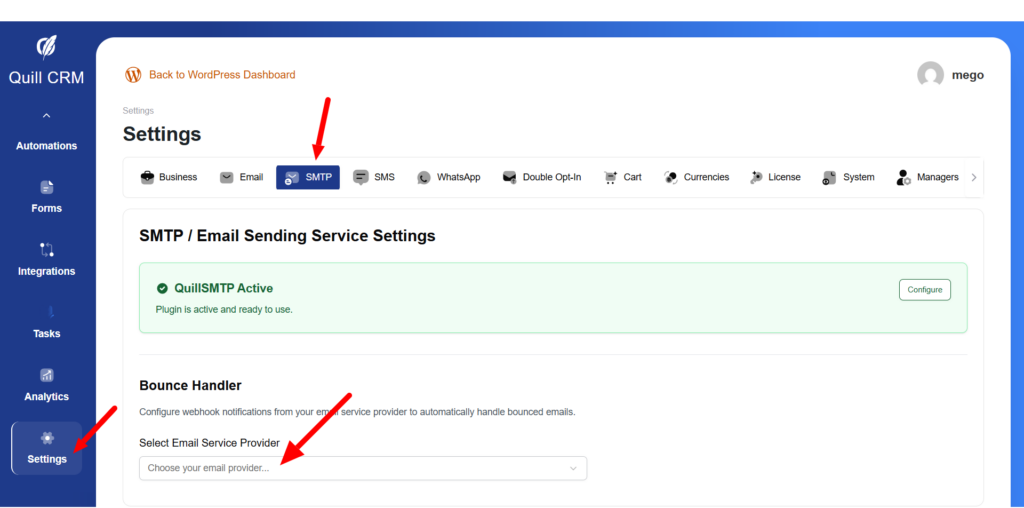
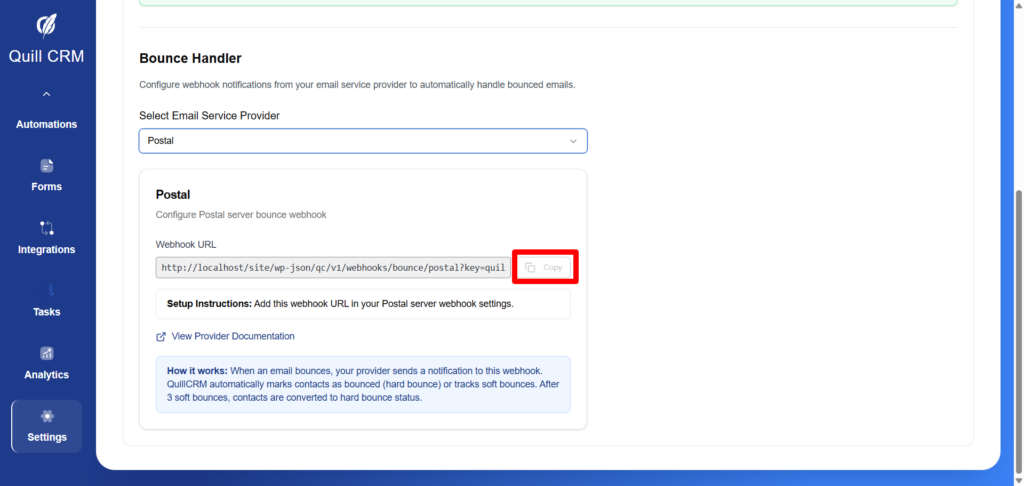
Your webhook URL will look like:> https://yoursite.com/wp-json/qc/v1/webhooks/bounce/postal?key=your_security_key
Step 2: Configure Postal Server
- Access your Postal server admin panel
- Navigate to your mail server’s Webhook Settings
- Add a new webhook:
| Field | Value |
|---|---|
| URL | Paste the webhook URL from Step 1 |
| Events | Enable bounce/delivery failure notifications |
| Enabled | Yes |
- Save the webhook configuration
Bounce Events Handled
| Postal Event | Bounce Type | Description |
|---|---|---|
| MessageBounced | Auto-detected | Email bounced back from recipient |
| MessageDeliveryFailed | Hard | Permanent delivery failure |
| MessageDelayed | Soft | Temporary delivery issue |