Twilio enables you to create SMS-based campaigns.
With a 98% open rate and 35% CTR, SMS marketing campaigns are more high-converting and cost-effective than emails.
QuillCRM Automations’s deep integration with Twilio allows you to set up compelling SMS campaigns for your business.
You can take advantage of text- and image-based messages (applicable for US and Canadian audiences) to create post-purchase sequences, recover abandoned carts, win back campaigns, and more.
But first, you need to connect Twilio with QuillCRM Automations.
Learn how to connect Twilio with QuillCRM Automations here
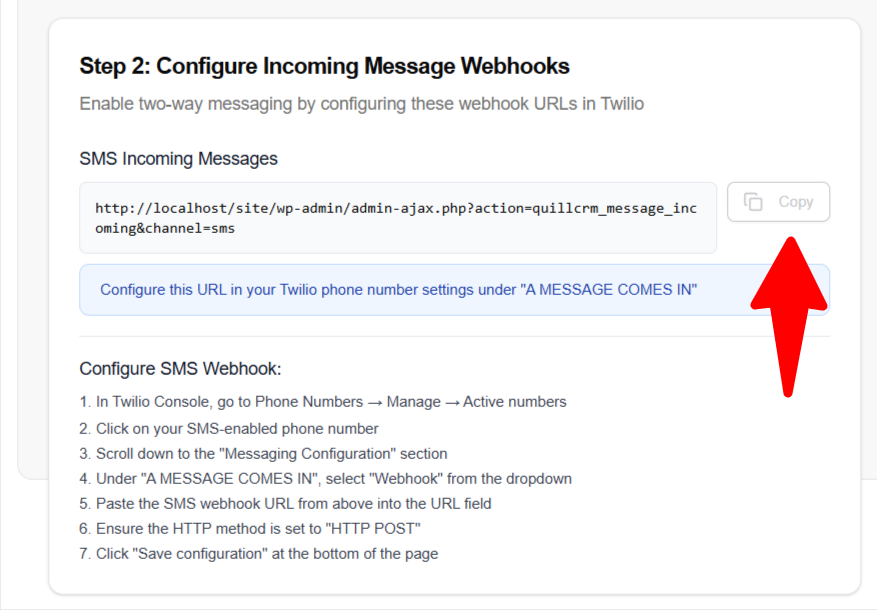
Configure SMS Webhook:
Click “Save configuration” at the bottom of the page
In Twilio Console, go to Phone Numbers → Manage → Active numbers
Click on your SMS-enabled phone number
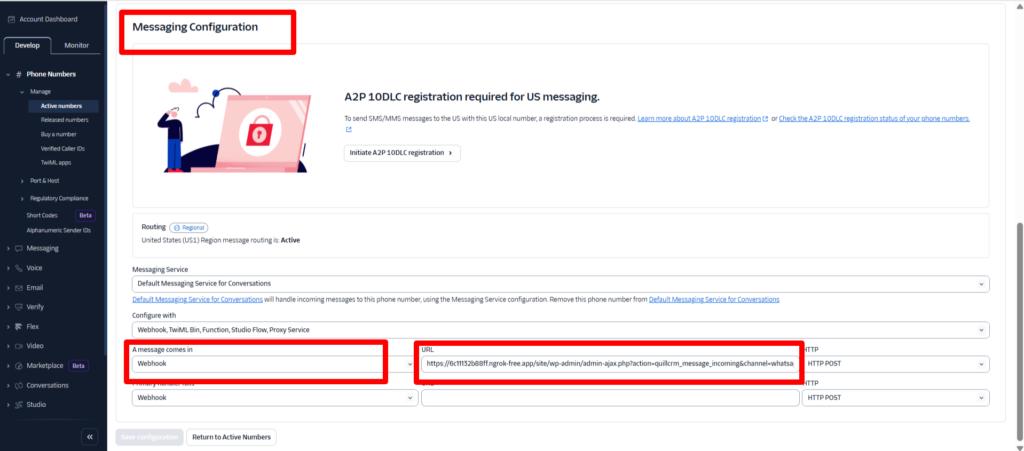
Scroll down to the “Messaging Configuration” section
Under “A MESSAGE COMES IN”, select “Webhook” from the dropdown
Paste the SMS webhook URL from above into the URL field
Ensure the HTTP method is set to “HTTP POST”
- In Twilio Console, go to Phone Numbers → Manage → Active numbers
- Click on your SMS-enabled phone number
- Scroll down to the “Messaging Configuration” section
- Under “A MESSAGE COMES IN”, select “Webhook” from the dropdown
- Paste the SMS webhook URL from above into the URL field
- Ensure the HTTP method is set to “HTTP POST”
- Click “Save configuration” at the bottom of the page