






















Quill CRM supports importing contacts from MailerLite using the MailerLite API. This migrates your subscriber groups and their associated data into Quill CRM.
Prerequisites
- A MailerLite API Key, available from your MailerLite account under Integrations → API.
- You must have at least one group with subscribers in MailerLite.
How to Import
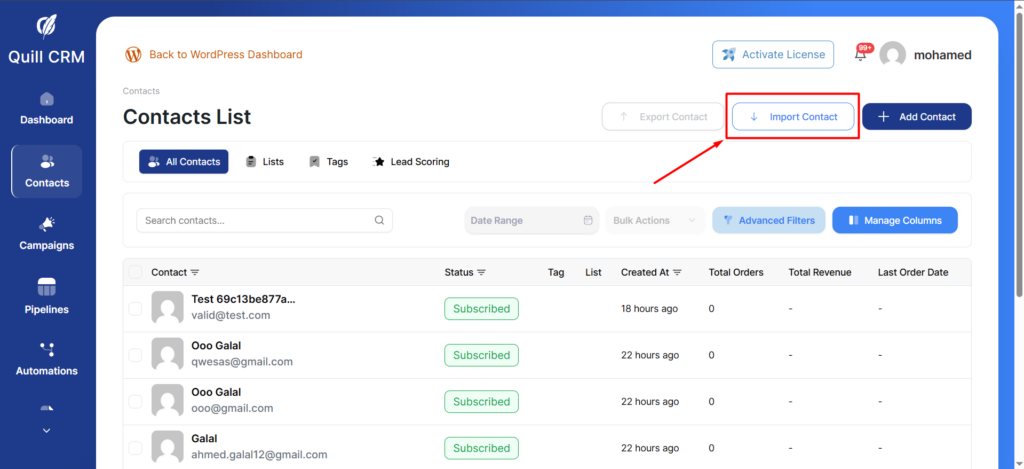
- Go to Quill CRM → Contacts and click “Import”.
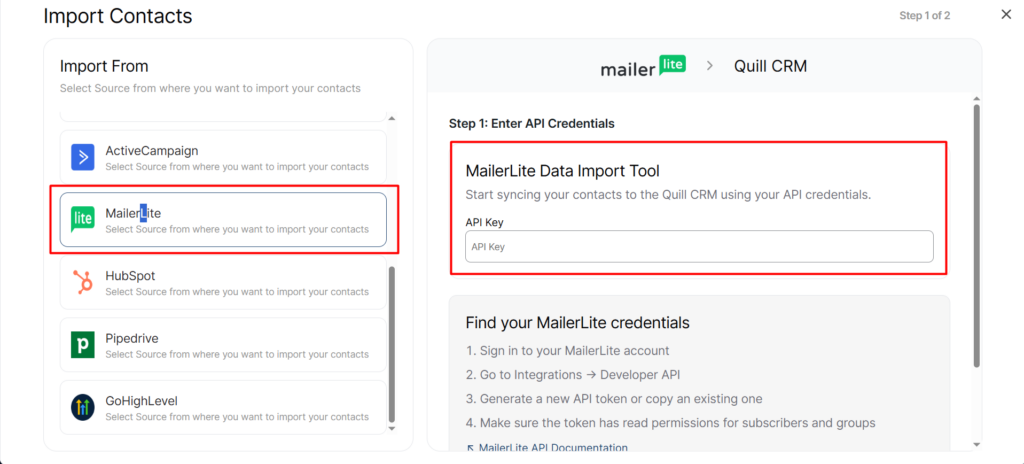
- Select “MailerLite” from the source list.
- Enter your API Key in the credentials form.
- Click “Connect & Fetch Data”. Quill CRM connects to MailerLite and retrieves your groups and subscriber fields.
- Configure Contact Field Mapping — map MailerLite subscriber fields to Quill CRM contact fields. The Email field is required.
- Configure Groups Mapping (labeled as Tags Mapping) — map your MailerLite groups to Quill CRM tags. Each subscriber’s group membership is treated as a tag assignment.
- Set Contact Profile options.
- Click “Import”.
What Gets Imported
MailerLite provides dynamic subscriber fields, so the available mapping depends on your MailerLite configuration. Common fields include name, email, phone, city, country, and any custom fields you’ve defined in MailerLite.
Important Notes
- MailerLite “groups” are mapped to Quill CRM tags (not lists).
- Field mapping works similar to CSV import — you manually map each MailerLite field to a Quill CRM field.
- The Email field mapping is mandatory; the import will fail if it is not mapped.