






















Quill CRM supports importing contacts from GoHighLevel (GHL) using OAuth authentication. This allows you to migrate your GHL contacts into Quill CRM with their associated tags and status.
Prerequisites
GoHighLevel uses OAuth 2.0 authentication, which is different from the simple API key approach used by other integrations. You’ll need:
- A GoHighLevel Developer App with OAuth credentials (Client ID, Client Secret).
- The Redirect URL provided by Quill CRM during setup.
Setting Up OAuth
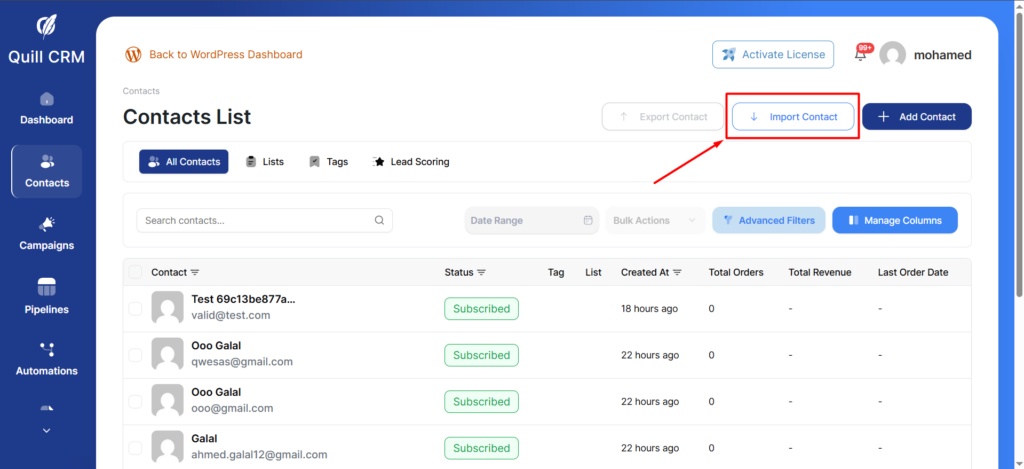
- Go to Quill CRM → Contacts and click “Import”.
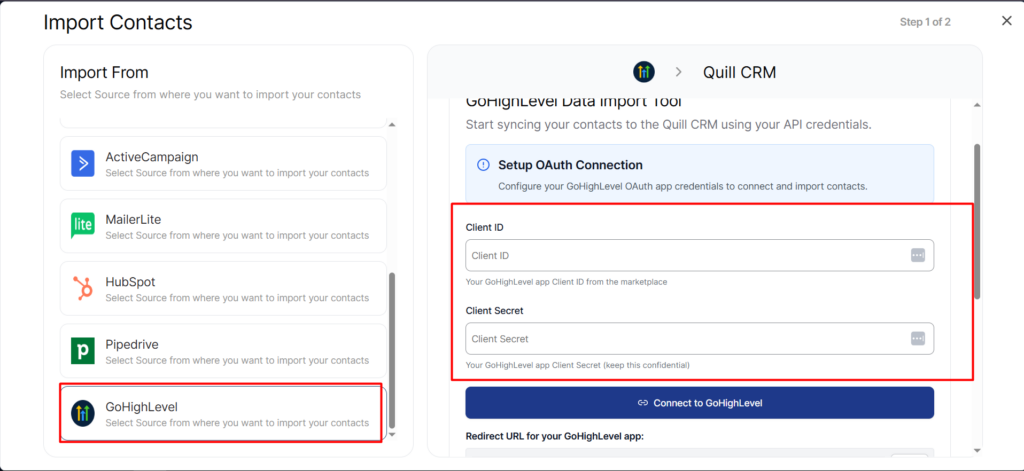
- Select “GoHighLevel” from the source list.
- If you haven’t connected before, you’ll see the OAuth setup form with fields for Client ID and Client Secret, plus the redirect URL to use in your GHL app settings.
- Enter your credentials and click “Connect”. You’ll be redirected to GoHighLevel to authorize the connection.
- After authorizing, you’ll be redirected back to Quill CRM with the connection established.
How to Import
- Once connected, Quill CRM will show your GHL contact count.
- Set your Contact Profile options (lists, tags, status, update existing).
- Click “Import” to start.
What Gets Imported
| GoHighLevel Field | Quill CRM Field |
|---|---|
| firstName | First Name |
| lastName | Last Name |
| phone | Phone |
Tags
Tags from GoHighLevel are imported. Additionally, the contact’s source in GHL is added as a tag (e.g., Source: Facebook).
Status Mapping
GoHighLevel contact status is mapped to Quill CRM email status. GHL contacts marked as active become “Subscribed” in Quill CRM.
Assigned User
If a GHL contact is assigned to a team member, this information is captured as a list assignment (e.g., Assigned to: John Smith).
Important Notes
- GoHighLevel import uses cursor-based pagination with 100 contacts per batch.
- OAuth tokens are stored securely and can be disconnected from the import settings.
- There is no field mapping UI for GoHighLevel — the mapping is handled automatically. Use the Contact Profile section to assign additional lists and tags.
- If your OAuth token expires, you’ll need to re-authorize the connection before importing.