






















FunnelKit (WP Marketing Automations) stores subscriber data in a similar format to FluentCRM. If you have FunnelKit active on your site, Quill CRM can import those subscribers directly from the database.
Prerequisites
- The WP Marketing Automations (FunnelKit Automations) plugin must be installed and active.
- FunnelKit must have subscriber data in its database.
How to Import
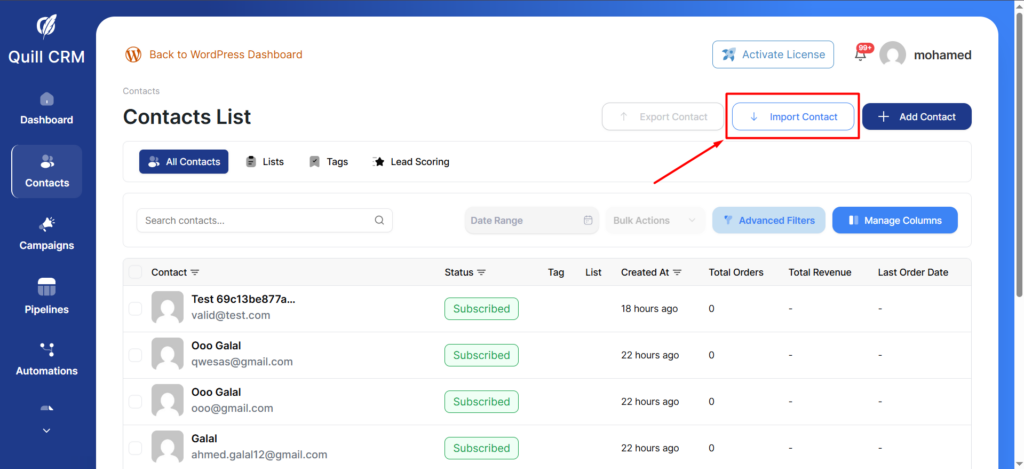
- Go to Quill CRM → Contacts and click “Import”.
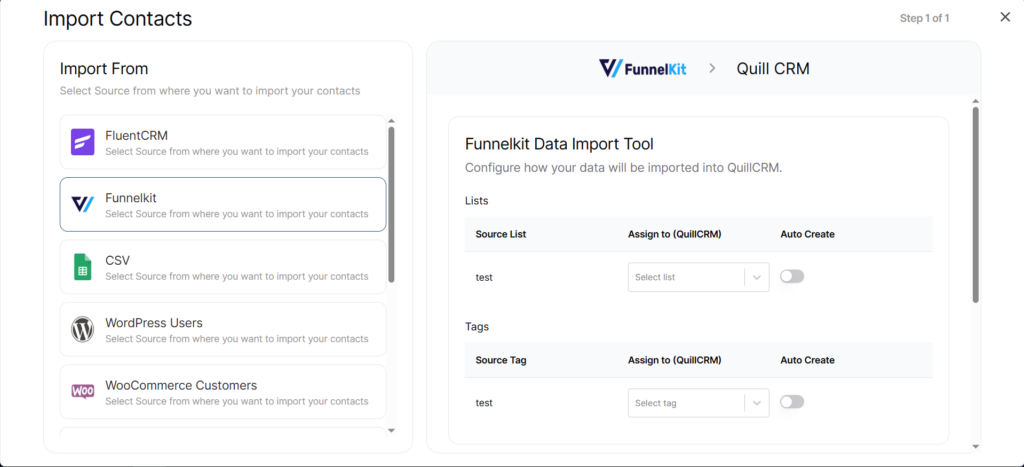
- Select “FunnelKit” from the source list.
- Quill CRM automatically reads FunnelKit subscriber data.
- Configure lists mapping and tags mapping as needed.
- Set Contact Profile options.
- Click “Import”.
What Gets Imported
The same core fields as FluentCRM (email, first name, last name, phone, address fields). FunnelKit lists and tags are also available for mapping.
Duplicate Handling
Same as all other import sources — matched by email address. Enable “Update Existing” to update, or leave it off to skip duplicates.