






















Quill CRM can import your existing WordPress users as contacts. This is useful when you want to start managing your registered users as CRM contacts.
How to Import
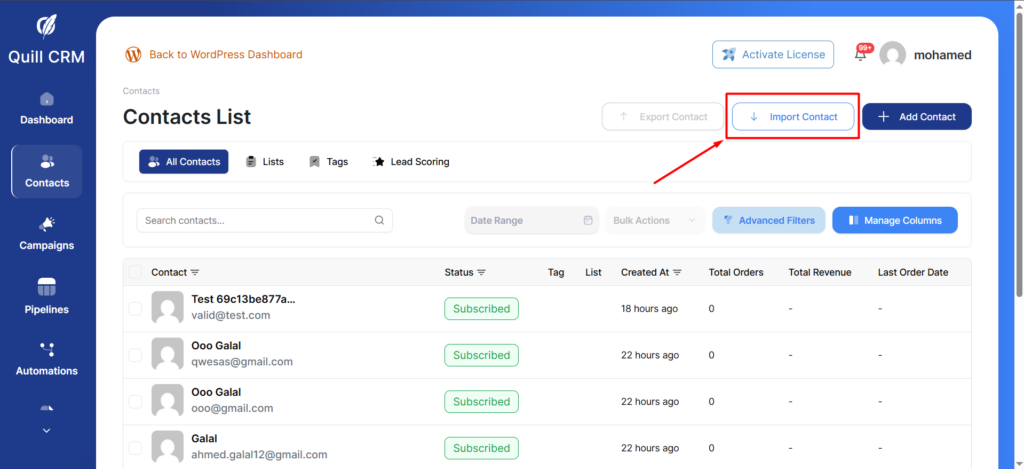
- Go to Quill CRM → Contacts and click “Import”.
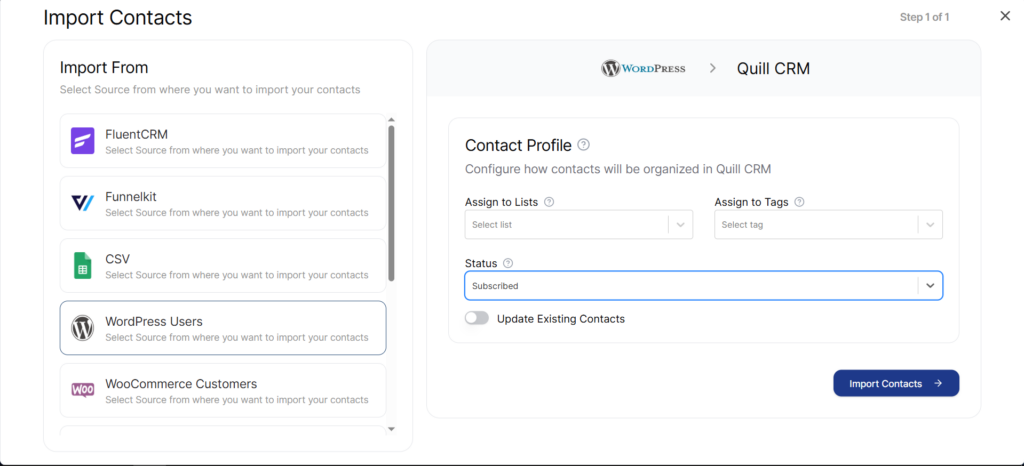
- Select “WordPress Users” from the source list.
- Quill CRM will count the total WordPress users available for import.
- Set your Contact Profile options (assign lists, tags, set status).
- Click “Import”.
What Gets Imported
| WordPress Field | Quill CRM Field |
|---|---|
| user_email |
Note: Currently, only the email address is imported from WordPress users. First name, last name, and other profile fields are not automatically mapped in this importer. You may want to use the CSV import method if you need to import additional user profile data.
Contact Profile Options
- Assign to Lists: Assign all imported users to specific lists.
- Assign Tags: Apply tags to all imported users.
- Contact Status: Set the email subscription status.
- Update Existing: Update existing contacts or skip duplicates.