






















Quill CRM can import your contacts from ActiveCampaign using the ActiveCampaign API. This allows you to migrate your entire contact database from ActiveCampaign to Quill CRM, including list and tag associations.
Prerequisites
You will need your ActiveCampaign API credentials:
- API URL: Your ActiveCampaign account URL (e.g.,
https://yourcompany.api-us1.com). - API Key: Found in your ActiveCampaign account under Settings → Developer.
How to Import
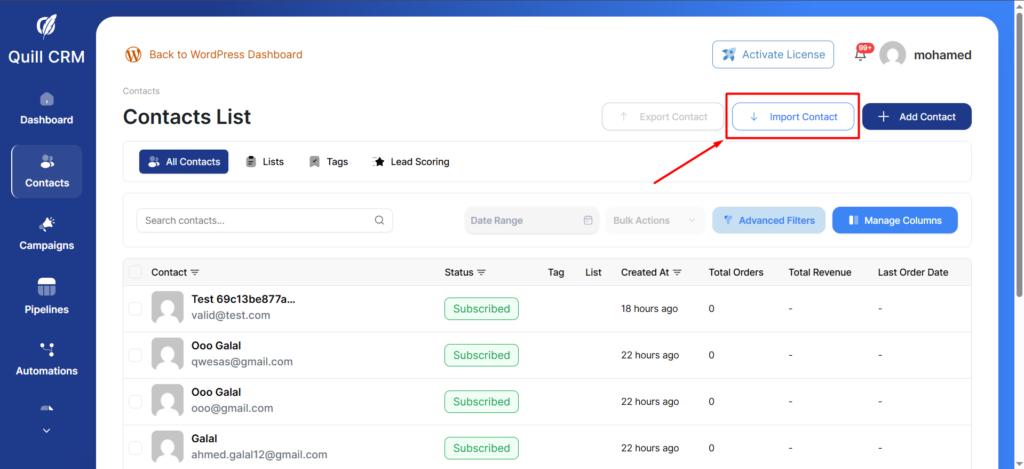
- Go to Quill CRM → Contacts and click “Import”.
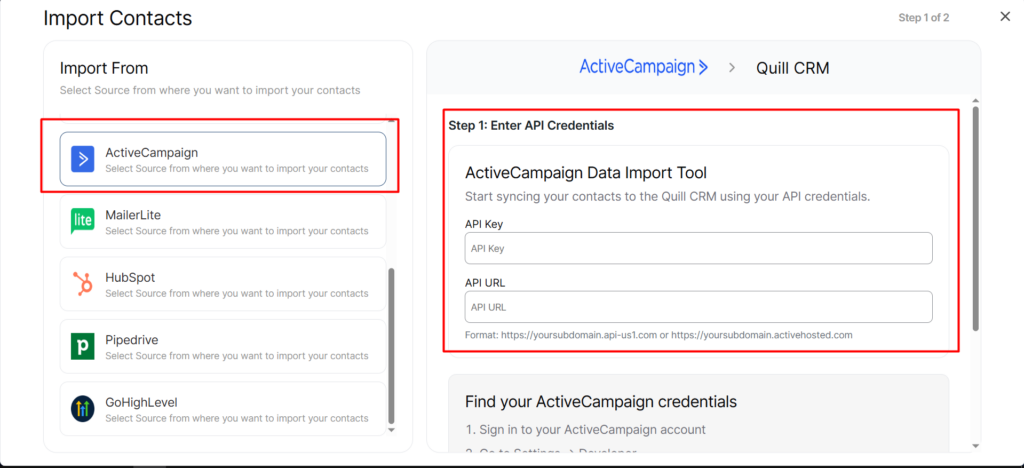
- Select “ActiveCampaign” from the source list.
- Enter your API URL and API Key in the credentials form.
- Click “Connect & Fetch Data”. Quill CRM connects to ActiveCampaign and retrieves your contact count, lists, and tags.
- Configure Lists Mapping — map your ActiveCampaign lists to Quill CRM lists (or auto-create).
- Configure Tags Mapping — map your ActiveCampaign tags to Quill CRM tags (or auto-create).
- Set Contact Profile options (additional lists/tags, status, update existing).
- Click “Import” to start.
What Gets Imported
| ActiveCampaign Field | Quill CRM Field |
|---|---|
| firstName | First Name |
| lastName | Last Name |
| phone | Phone |
Lists and tags from ActiveCampaign are mapped based on your configured mappings in Step 5 and 6 above.
Batching
Contacts are imported in batches of 20. The system uses offset-based pagination to fetch contacts from the ActiveCampaign API.