






















Quill CRM can import persons (contacts) from Pipedrive CRM using the Pipedrive API. This is useful for sales teams migrating from Pipedrive who want to use Quill CRM for email marketing and automation.
Prerequisites
- Your Pipedrive API Domain (e.g.,
yourcompany.pipedrive.com). - Your Pipedrive API Token, found in Pipedrive under Settings → Personal Preferences → API.
How to Import
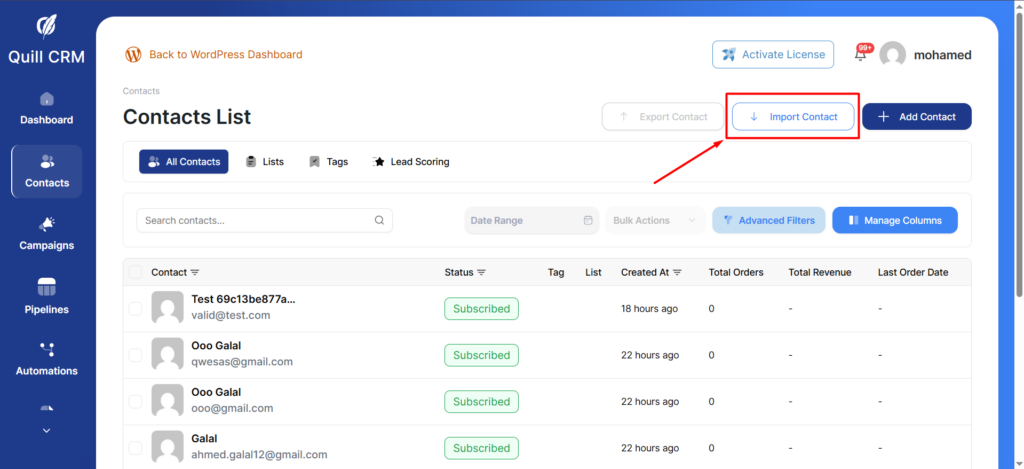
- Go to Quill CRM → Contacts and click “Import”.
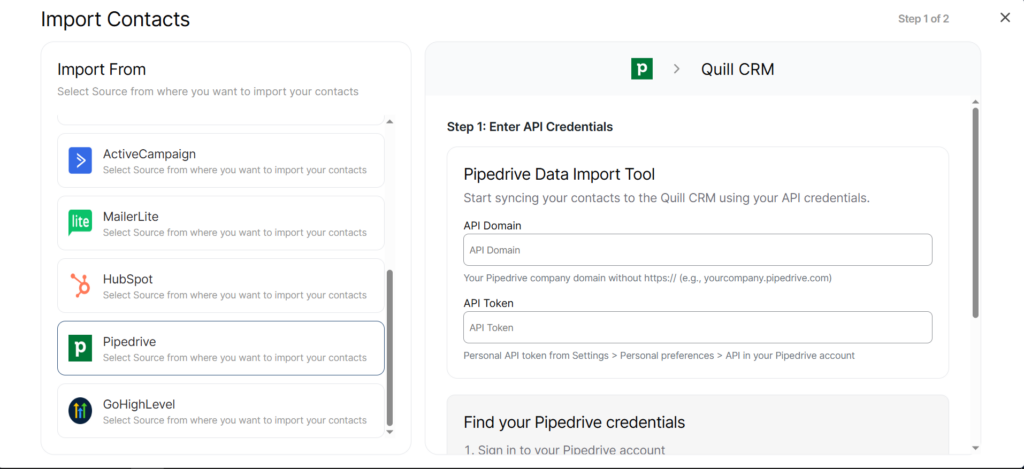
- Select “Pipedrive” from the source list.
- Enter your API Domain and API Token.
- Click “Connect & Fetch Data”.
- Set your Contact Profile options (lists, tags, update existing).
- Click “Import”.
What Gets Imported
| Pipedrive Field | Quill CRM Field |
|---|---|
| Primary email | |
| name (split) | First Name / Last Name |
| Primary phone | Phone |
Automatic Tags
Pipedrive contacts automatically receive the following tags during import:
imported-from-pipedrivepipedrive-owner-{owner name}(if assigned to a user)pipedrive-org-{organization name}(if linked to an organization)pipedrive-label-{label}(if a label is applied)
Email Status
A contact’s active_flag in Pipedrive determines their email status in Quill CRM (active = subscribed, inactive = unsubscribed).
Important Notes
- Pipedrive import uses cursor-based pagination and processes 100 persons per API call.
- The importer scans up to 10,000 contacts for the total count estimate.
- There is no list or tag mapping UI for Pipedrive — tags are auto-generated as described above. You can assign additional lists and tags via the Contact Profile section.